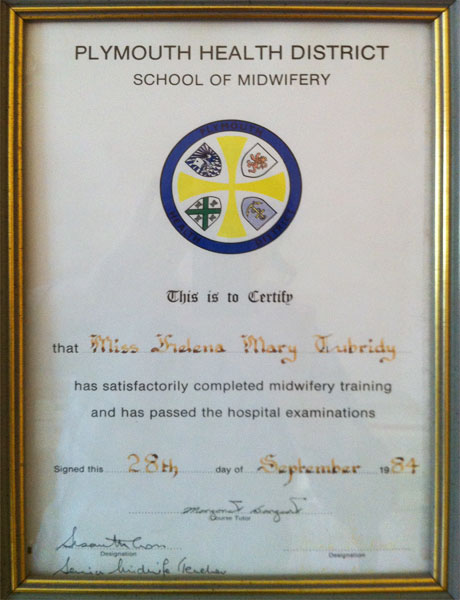
Qualifications
- Registered General Nurse, Royal City of Dublin Hospital
- Registered Midwife (UK), Freedom Fields Regional Hospital, Plymouth, England
- Master’s in Ethics, Dublin City University
- Mindfulness Teacher NUI Maynooth
- Practical Hypnotherapy & Psychotherapy, Advanced Diploma, ICHP Griffith College, Dublin
- Medical Hypnosis, Dr Jack Gibson, St. John’s Castle, Naas, Co. Kildare.
- Certified Hypnotherapist, National Guild of Hypnotists.
- Fertility Nutrition for Professionals Diploma, Monash University
- Fertility Therapist and Counsellor, HypnoBirthing Institute
- Stress Management, International Therapy Examination Council, England (ITEC)
- Mindstream Diploma in Life & Business Coaching, European Coaching Institute
- Post Graduate Training Programme Mentor at Institute of Clinical Hypnotherapy & Psychotherapy
- Eye Movement Desensitisation & Reprocessing EMDR practitioner
- Creative Analytical Hypnotherapy Certificate
- Conversational Hypnotherapy, ICHP
- Hypnotherapy for Pain, and for Depression’ certificates
- Clinical Pharmacology Certificate, Institute of Clinical Pharmacology
- Virtual Gastric Band Surgery, London College of Clinical Hypnosis
Share the post "Helena Tubridy Professional Qualifications"
Add this site to your Home Screen
Save this resource to your phone home screen for quick access to your book companion, just like an app.
Android / Chrome
Tap the install button below if it appears. If not, use the manual Chrome steps.
- Tap the Chrome menu button, usually the three dots.
- Tap Add to Home screen or Install app.
- Follow the on-screen instructions.
iPhone / iPad Chrome
- Tap the Share icon on the right of the address bar.
- Scroll down and tap Add to Home Screen.
- Edit the name if needed, then tap Add.
iPhone / iPad Safari
- Tap the Share button. On some iOS versions, tap the More button first, then Share.
- Scroll down and tap Add to Home Screen.
- Edit the name if needed, then tap Add.
Desktop Chrome
- Click the Chrome menu button.
- Choose Cast, save, and share, then Install page as app.
- If an install icon appears in the address bar, you can use that instead.
Microsoft Edge
- Open the browser menu.
- Choose Apps, then look for Install this site as an app or Add to phone.
- Follow the on-screen instructions.
Add to Home Screen
- Open your browser menu or share menu.
- Look for Add to Home Screen, Install app, or similar.
- Follow the on-screen instructions.
Install this site as an app
Use your browser menu and look for an option such as Install app, Install page as app, or Add to Dock.